
- Chapter 1: Understanding the "Digital Handshake"
- Chapter 2: Phase One — The Foundation (Correcting the NIN)
- Chapter 3: Phase Two — Synchronizing with JAMB (The Re-Query)
- Chapter 4: Phase Three — Correcting Names After Registration
- Chapter 5: Preventing Future Mismatches
- Chapter 6: Troubleshooting 2026 Error Codes
- Chapter 7: Impact on the CAPS Portal and Admission
- Section 8: Frequently Asked Questions (FAQ)
- Final Thoughts for 2026 Aspirants

The Ultimate Guide: Fixing Name Mismatch Between NIN and JAMB Portal (2026 Edition)

In the Nigerian educational landscape of 2026, the synchronization between the National Identity Management Commission (NIMC) and the Joint Admissions and Matriculation Board (JAMB) has become absolute. Your National Identification Number (NIN) is no longer just a requirement; it is the digital foundation of your academic identity.
A name mismatch—whether it is a swapped surname, a missing middle name, or a minor spelling error—can lead to the suspension of your admission, disqualification from the Unified Tertiary Matriculation Examination (UTME), or lifelong discrepancies in your professional certificates.
This 2,000-word comprehensive guide provides a step-by-step roadmap to resolving these discrepancies efficiently in 2026.
Chapter 1: Understanding the “Digital Handshake”
To fix the problem, you must understand how it started. In 2026, JAMB does not manually type your name into their system. Instead, they use an API (Application Programming Interface) to “pull” your data from the NIMC database the moment you send your NIN to 55019 or 66019.
1.1 Why Mismatches Occur
-
The NIMC Entry Error: The enrollment officer at the NIN center may have misspelled your name.
-
The O’Level Conflict: Your WAEC/NECO results carry a different name arrangement than your NIN.
-
The Marriage Factor: Candidates who have married and changed their names often have “old” names on their NIN but “new” names on their JAMB profile.
-
Name Swapping: In Nigeria, the order is typically Surname, First Name, Middle Name. If your NIN follows First Name, Surname, Middle Name, JAMB’s system will flag it as a mismatch during university screening.
Chapter 2: Phase One — The Foundation (Correcting the NIN)
If the error originates from your NIN slip, you cannot fix it on the JAMB portal first. You must correct the source. In 2026, NIMC has modernized this process through the Self-Service Modification Portal.
2.1 The NIMC Self-Service Method
Gone are the days of sleeping at NIMC local government offices. Follow these steps:
-
Access the Portal: Visit
https://selfservicemodification.nimc.gov.ng. -
Identity Verification: Enter your current NIN. You will receive an OTP (One-Time Password) on the phone number linked to your NIN.
-
Data Selection: Choose “Name Modification.”
-
Upload Supporting Documents: For a name change in 2026, you strictly need:
-
A Sworn Affidavit from a High Court.
-
A Newspaper Publication in a National Daily (not older than 6 months).
-
A Birth Certificate or Attestation of Age.
-
-
Payment: The statutory fee for name modification is ₦1,522.50, payable via Remita.
-
Approval Window: Once submitted, it takes 2 to 5 working days for the NIMC backend to update.
2.2 When to Visit a Physical NIMC Office
If the self-service portal rejects your fingerprints or photo, you must visit a “Mega Center.” In 2026, ensure you book an appointment online first to avoid being turned away.
Chapter 3: Phase Two — Synchronizing with JAMB (The Re-Query)
Even after NIMC fixes your name, the JAMB portal might still display the old information. This is due to Data Caching (the system “remembering” the old version to save speed).
3.1 The “RE-QUERY” Command
If you have corrected your NIN but your JAMB profile code still reflects the old name, do not panic.
-
Action: Visit any JAMB Accredited CBT Centre.
-
Task: Ask the administrator to perform a “NIMC Data Re-Query.”
-
Process: The administrator will input your NIN into the JAMB central system and click a button that forces the JAMB server to talk to the NIMC server again. This usually updates the record instantly.
Chapter 4: Phase Three — Correcting Names After Registration
If you have already registered for the UTME, sat for the exam, or been offered admission, and then discovered a mismatch, the process is more formal and involves the JAMB Correction of Data (COD) service.
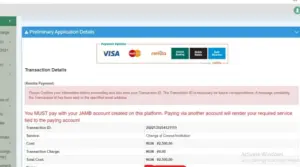
4.1 The Step-by-Step COD Process
-
Login: Go to your JAMB e-Facility profile (
https://efacility.jamb.gov.ng). -
Select Service: Click on “Correction of Data” on the dashboard.
-
Choose “Name”: You will be prompted to select the specific year of the exam.
-
Transaction ID: The system will generate a Transaction ID.
-
Payment: Pay the ₦2,500 fee via your ATM card or at a bank branch.
-
The Indemnity Form: After payment, the system generates an “Indemnity Form.”
-
Institutional Approval: * Print the form.
-
Take it to your University’s Registrar or Dean for a signature and stamp.
-
Submit the signed form to the nearest JAMB State Office.
-
-
Final Approval: Once the JAMB Zonal Coordinator approves the form, your names will be updated on the CAPS portal.
Chapter 5: Preventing Future Mismatches
In 2026, data integrity is everything. To ensure you never face this issue again:
5.1 The “Golden Rule” of Name Arrangement
Always stick to one format across all documents (Primary School, WAEC, NIN, Bank, and JAMB):
[SURNAME] [FIRST NAME] [MIDDLE NAME]
5.2 Avoid the “Proxy” Trap
Never allow a Cybercafe operator to use their phone number to generate your profile code. The “owner” of the SIM card can sometimes affect the “owner” of the data being pulled. Use a SIM card registered in your name with your own NIN.
Chapter 6: Troubleshooting 2026 Error Codes
-
“NIN Not Validated”: This means your NIN is new and hasn’t hit the central server. Wait 48 hours.
-
“Phone Number Already Used”: In 2026, a phone number can only be used by one candidate. You must buy a new SIM if you used it for a sibling in the past.
-
“Record Mismatch – Date of Birth”: If your name is correct but your DOB is wrong, you must follow the same NIMC modification process mentioned in Chapter 2.
Chapter 7: Impact on the CAPS Portal and Admission
The Central Admission Processing System (CAPS) is the engine that drives your admission. If there is a name mismatch:
-
Transfer Issues: You might be recommended for admission, but your “Acceptance” will be blocked.
-
NYSC Problems: Years later, when you graduate, the National Youth Service Corps (NYSC) will pull your data from JAMB. If the name is wrong, you will be unable to mobilize for service.
-
Bank Account (BVN) Linkage: In 2026, many student loan programs require a match between JAMB, NIN, and BVN. A mismatch here could cost you your funding.
Section 8: Frequently Asked Questions (FAQ)
Q: Can I use a Sworn Affidavit to change my name directly at the JAMB office? A: No. In 2026, JAMB does not accept affidavits for name changes. You must change it at NIMC first.
Q: How long does the whole process take? A: If you use the NIMC Self-Service portal, the entire process (from NIMC correction to JAMB update) takes about 7 to 14 days.
Q: I corrected my name, but my O’Level result still has the old name. What do I do? A: You do not need to change your O’Level result. As long as your NIN and JAMB profile match, you can present your Change of Name Newspaper Publication and Affidavit during physical screening at your university to explain the O’Level difference.
Final Thoughts for 2026 Aspirants
Consistency is the key to a stress-free admission process. Your name is your brand. Ensure that the “Bose” on your birth certificate is the same “Bose” on your NIN and the same “Bose” on your JAMB slip.
By following the 2026 digital protocols—NIMC Self-Service first, JAMB Re-Query second—you can resolve any mismatch without losing your admission slot.

📚 You Might Also Like



💬 No Comments