
- What is JAMB CAPS?
- How Does JAMB CAPS Works?
- Importance of JAMB CAPS 2026/2027
- How to Access and Login to JAMB CAPS
- How to Check, Accept, or Reject Admission on JAMB CAPS
- Check Admission Status:
- Accept or Reject Admission:
- How to Upload Your Result on JAMB CAPS 2026/2027
- How to Accept or Reject a Course Transfer on JAMB CAPS 2026/2027.

Among the least questions that we have Entertained about JAMB CAPS 2026/2027 Accept Or Reject Admission includes: What is everything I need to know about JAMB CAPS?, Is it true that I can check my admission Status Using JAMB CAPS?.

In today’s episode of “JAMB Blog Series” we will discuss JAMB CAPS, exposing hidden facts, importance, and how you can get around your JAMB CAPS profile Accept Or Reject Admission like a pro.
We all know that access to Admission before the existence of JAMB CAPS was as confusing as how confused can be, before now, a student can be given multiple admission from different schools.
Before the advent of JAMB CAPS 2026/2027, we also had the issue of students travelling to far distance to check for their names on the admission list released by their School of choice.
So in this blog Post, we are going show you guys How To Accept and Reject Admission On JAMB CAPS, The change in method for checking admission by the Board is aimed at protecting the details of the candidates and upholding seamless admission process, we are going to discuss broadly on JAMB CAPS 2026/2027.
Note: All admissions offered by institutions can only be accepted or rejected either through the 55019 or 66019 channels or by using the candidate’s biometrics at any accredited CBT centre or JAMB Office.
What is JAMB CAPS?
The JAMB CAPS (Central Admissions Processing System) is the official online platform used by the Joint Admissions and Matriculation Board (JAMB) in Nigeria to manage and automate the admission process for tertiary institutions. It provides a central hub for candidates to check their admission status, accept or reject offers, and for institutions to process admissions fairly and transparently.
JAMB CAPS is an online platform that allows candidates to check their admission status, accept admission, reject admission, and know the institution that has offered them admission, and many other things that concern admission into the University.
How Does JAMB CAPS Works?
Having explained what JAMB CAPS means, it is also important for you to understand how JAMB CAPS works. So in this section, I will take time to explain to you how the JAMB CAPS works.
Since the existence of JAMB CAPS it has Performed the following Task
- Evidence of crucial information to every stakeholder.
- Encouraging openness during the admission process.
- Reducing the number of errors related to manual efforts.
- Giving institutions the freedom in admissions.
- Facilitating of the admission procedure.
- Optimizing the admission possibility and rescinding several admissions.
JAMB CAPS is the only online platform that centralizes and automates the entire admission process for Nigerian tertiary institutions, ensuring transparency, fairness, and efficiency by allowing candidates to track their status, accept or reject offers, and making it easier for institutions to process admissions on a merit-based system. Uploading your O’Level results to CAPS is crucial, as it’s the gateway to admission and essential for candidates to be officially recognized as students.
Importance of JAMB CAPS 2026/2027
Centralized Platform: JAMB CAPS is the official online system for all admissions into Nigerian universities, polytechnics, and colleges of education.
Transparency: Candidates can easily monitor their admission status, reducing uncertainty and building trust in the admission process.
Fairness: The system promotes merit-based and standardized admission procedures, ensuring all applicants are evaluated fairly.
Efficiency: CAPS streamlines and automates the admissions process, allowing institutions to process admissions more swiftly and candidates to receive timely updates.
Candidate Empowerment: Candidates are empowered by having information on available choices and can accept or reject admission offers on the platform.
Crucial for O’Level Results: Uploading your O’Level results to CAPS is a mandatory step, and failing to do so can lead to the loss of your admission.
Official Recognition: To be officially recognized as a student in a tertiary institution and to obtain your JAMB admission letter, you must accept the admission offer on CAPS.
Keeps JAMB as a Clearing House: CAPS helps JAMB to act as the central clearing house for admissions, ensuring all processes align with the board’s initial goals.
How to Access and Login to JAMB CAPS
To Login JAMB CAPS follow these steps
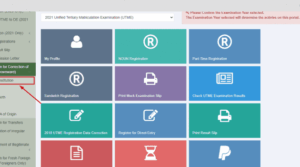
- Visit the JAMB e-Facility Portal: Navigate to the official JAMB e-Facility portal.
- Login to Your Account: Enter your registered email address and password to access your dashboard.
- Access CAPS: Once logged in, locate and click on the ‘Check Admission Status’ tab. Then, select ‘Access my CAPS’ to enter the CAPS portal.
How to Check, Accept, or Reject Admission on JAMB CAPS
Upon signing in to JAMB CAPS, the following steps will help you to maintain your admission:
Check Admission Status:
- Your admission status is going to be posted in the CAPS portal.
- It can be either Admitted,
- Not Admitted or Admission in Progress.
Accept or Reject Admission:
- In case of an admission, there would be two choices, which are Accept Admission and Reject Admission.
- Click on Accept Admission to accept.
- Click on Reject Admission, in case you do not want to accept the offer.
Note: By accepting an admission offer you will no longer be considered to have an admissions into other institutions. On the other hand, decline of an offer opens a door to other institutions to admit him or her.
How to Upload Your Result on JAMB CAPS 2026/2027
- Login to JAMB e-Facility: Access your account as previously described.
- Navigate to ‘Upload O’Level Results’: On your dashboard, find and click on this option.
- Enter Your Results: Carefully input your subjects and corresponding grades.
- Submit: After entering all required information, click ‘Submit’ to upload your results.
How to Accept or Reject a Course Transfer on JAMB CAPS 2026/2027.
- Access the ‘Transfer Approval’ Section: Within the CAPS portal, locate and click on ‘Transfer Approval’.
- View Proposed Transfer: Details of the new course will be displayed for your consideration.
- Accept or Reject:
- To accept the new course, click ‘Accept’.
- To decline, click ‘Reject’

📚 You Might Also Like



💬 No Comments